On this page you'll find a list of questions and answers regarding the website. We'll be adding to the page as and when we get questions to be answered.
1Where can I find my study aids or teacher aids that I've checkout/ordered?
Hover on the 'My Account' text/link in the navigation and select 'Account Information'.
Look for a heading 'Available Downloads'. All products you've ordered/checked out will be listed here for downloading.
2How do I download the study aid or teaching aid?
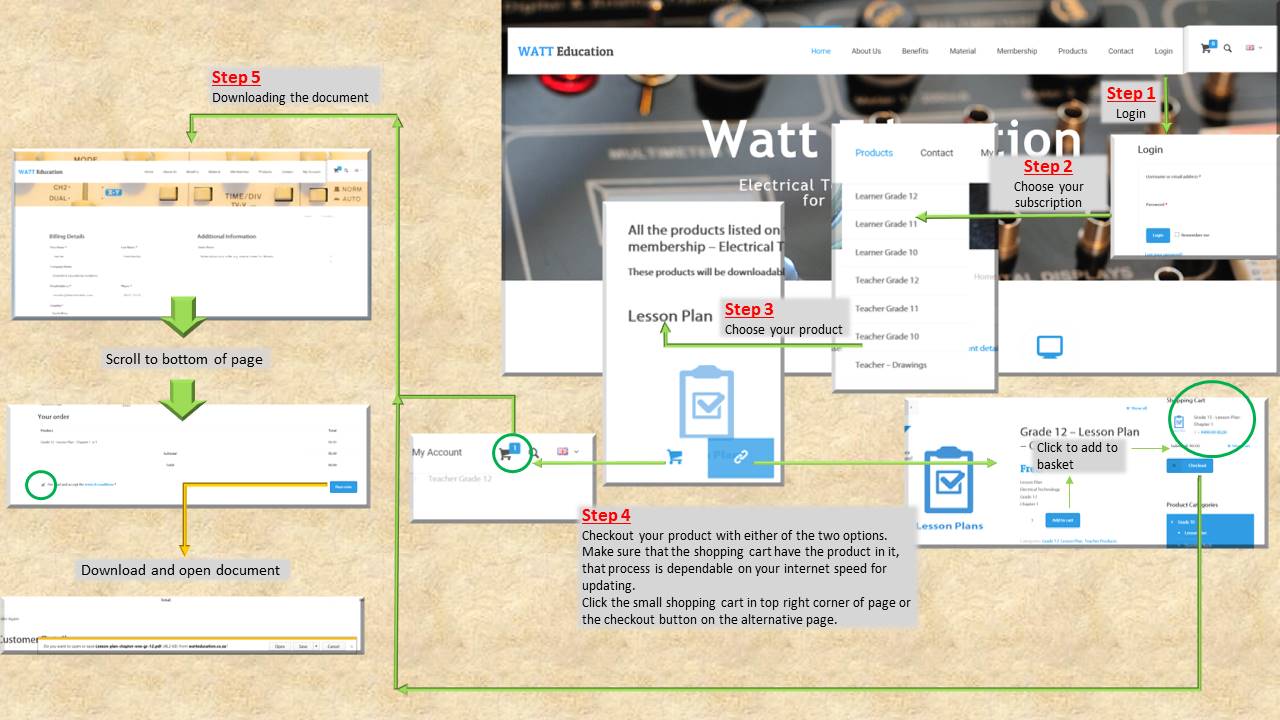
- : Login with your username and password.
- : Choose the subscription you've subscribed to.
- : Choose the product (study aid or teaching aid) you'd like to download.
- : Add each product to your shopping cart by selecting the number of units you'd like to download (you'd need to click on the 1, if you only want to download 1) and then click add to basket.
- : Once you've added all the products to the basket, either click on the basket icon on the top right of navigation or click the checkout button on the product page.
- : Your membership Billing Details page will display. Scroll to the bottom of the page and tick the box alongside 'I've read and accept the terms & conditions' then click the Place Order button
- : Your Order Details will then display. Click on the product (written in blue text) to download your product.